
Dayton's Warrant Notice Sequence
Dayton moves through a set sequence. A citation comes first, then a Last Warrant Notice that carries another appearance date. Ignore both and the court warns that an arrest warrant may follow. The city also flags two side effects: entry into a database and possible impoundment of your vehicle. Not every step applies to every citation, so call the court and ask where your case actually stands. A notice, a balance, and any police contact are separate details. Treat none of them as the final word. The clerk's current case status is the record that counts, not an old notice or search result. The city's official Dayton warrant page walks through the local sequence.
Checking for a Warrant in Dayton
Begin with Dayton Municipal Court when the citation came from the city. The court sits at 2002 North Cleveland Street, Dayton, and lists 936-258-5312 and court@daytontx.org. Counter hours run Monday through Friday, 8 a.m. to 5 p.m. The clerk there can confirm status and answer payment, reset, and judge-review questions.
- Find the citation or court number and note the listed date.
- Use the official Dayton Tyler portal for a city citation search.
- Call the Municipal Court if the portal result is unclear or no record appears.
- Ask whether a Last Warrant Notice, FTA, or arrest warrant was issued.
- Confirm the payment, appearance, and recall steps with the clerk.
Dayton Warrant Types
Dayton's city court works its own Class C state-law and ordinance cases. A traffic or ordinance citation can move through a notice and failure-to-appear process, and a judge may issue arrest process once the court's required steps run out. A payment plan or a community-service request is an option, not a warrant type.
| City record | How it may arise | Dayton contact |
|---|---|---|
| Traffic citation | Alleged violation handled by Municipal Court | Dayton Municipal Court clerk |
| Last Warrant Notice | Notice after an unresolved citation or missed date | Municipal Court |
| FTA or arrest warrant | Failure to respond or appear, subject to court steps | Municipal judge and clerk |
| Police report | Separate city police record | Dayton Police Department |
The court should explain the label and what action can change the record.
Dayton Warrant Portal Fields Without Personal Data
Dayton links an official Tyler citation and payment portal. Search modes on its face include citation number, driver's-license information, name and date of birth, plate, and business name. Open the Dayton Municipal Court portal to run the city's live search. It covers Dayton Municipal Court only, so it is not a Sheriff or countywide warrant lookup.
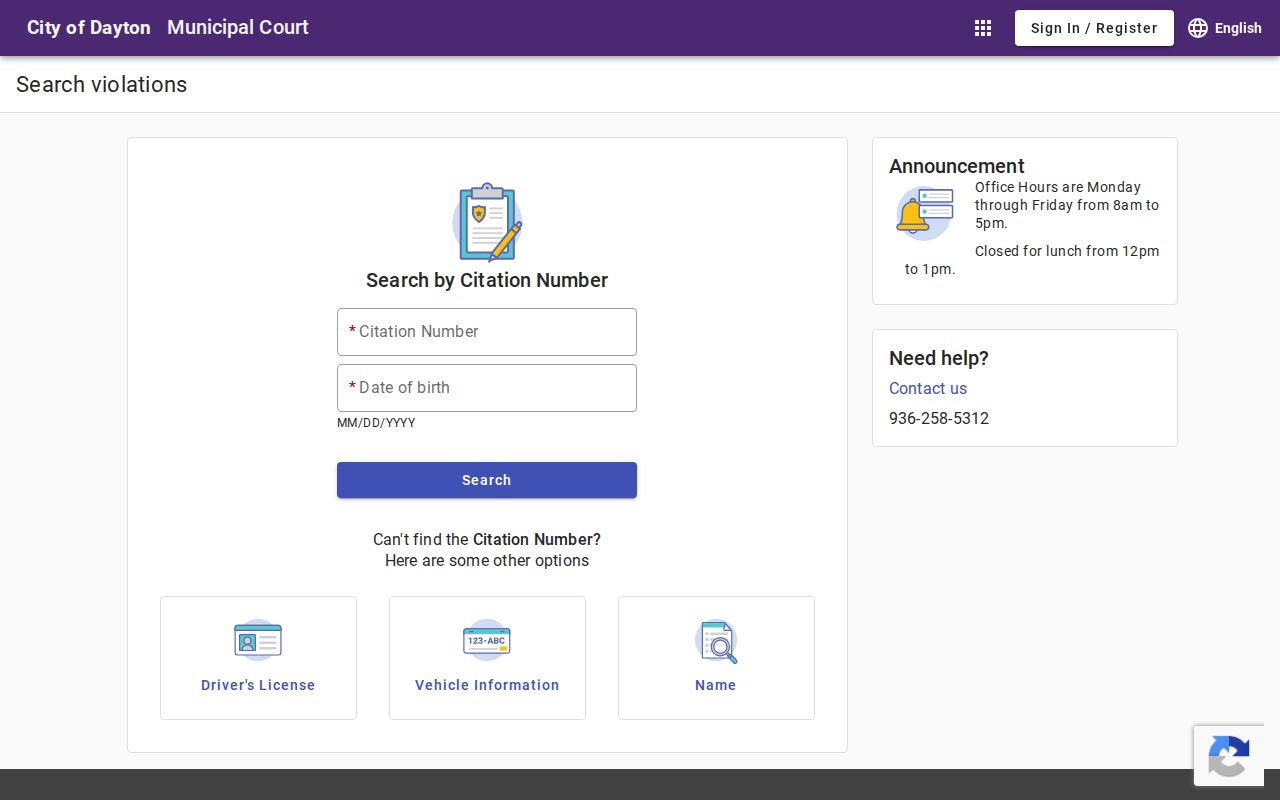
Never post a filled-in screen or share a birth date, license number, or plate in a public link. When a result needs explaining, the Dayton court clerk is the right person. Only that office can confirm a result is current.
Inside a Dayton Warrant Record
Dayton publishes no sample warrant row or local number format on its public pages. The portal is a citation transaction tool, not a full warrant roster. Ask the Dayton clerk to define the status flag and note the date the case was checked.
| Citation or case number | Citation No. on Notice, the city's retrieval key. |
|---|---|
| Notice stage | Citation, Last Warrant Notice, FTA, or later process. |
| Balance and fees | Current amount from the court; collection fees may apply under its notice. |
| Payment record | Shows a transaction, not necessarily a court recall. |
| Warrant status | Ask whether process remains active or was recalled by the judge. |
Never use a sample field table to publish another person's name or identifiers.
Dayton Warrant Payment Choices and Plan Terms
Dayton Municipal Court takes full payment at the window, by mail, online, or by phone. Cash, credit card, cashier's check, and money order all work, but no personal checks. Payment plans start with a $100 down payment, then $100 each month. An indigent person may ask the judge about community service in person. Warrants sent to collection after more than 60 days can carry an added 30% fee, the city says. These terms are Dayton-specific, so ask the clerk for the current balance before guessing. The clerk can also say whether a plan, judge review, or community service fits your case. See Dayton's official appearances and payments page before relying on an older notice.
How Dayton Warrants Fit the County System
Dayton Municipal Court controls its own city citations and any recall. The Dayton Police Department answers police-report and safety questions. County-level checks go to the Liberty County Sheriff's Warrants Division. The Sheriff says it cannot check another agency and posts no online public roster. A ticket assigned to JP4 or another court follows the court printed on it. See the county overview for the separate county routes.
Dayton Police and Municipal Court
Dayton Municipal Court owns city citations, payment, appearance dates, and warrant status. Dayton Police handles public-safety contacts and police records. Match your question to the right office. A police report request will never confirm a Dayton court warrant.
Dayton Municipal Court
City citations, appearance, payment, and warrant status
936-258-5312
2002 North Cleveland Street; court.org
Dayton Police Department
Police contact and incident-record questions
936-258-7621
117 Cook Street
Both offices serve Dayton but keep different records.
Dayton Warrant Records Requests Follow City Routes
For a public record in Dayton, first identify the department that keeps it, then describe the document, date, or citation as closely as you can. Texas Government Code Chapter 552 sets the public-information request framework, with exceptions. A police report, a court docket, and a payment record may sit with separate city offices. A written request only seeks an existing document. It cannot ask a judge to recall process or certify current warrant status. Use the city office instructions to submit, and ask for the response route if material is withheld or redacted. For a case status question, skip the request and contact the clerk directly. Read Texas Government Code Chapter 552 for the statewide public-information framework.
Dayton Warrant Records and Public Access
Texas public-information rules cover Dayton city records, though confidentiality and law-enforcement limits still apply. Use the city office for a municipal record and ask what can be released. A portal result may be narrow or stale. Call the Dayton clerk to confirm whether a warrant was issued, paid, or recalled.
Access rules:
Texas Government Code Chapter 552 sets public access and withholding rules.
Family Code Section 58.010 restricts access to juvenile arrest-warrant files.
Ask the Dayton court whether a specific record can be inspected and what request method it accepts.
Dayton Warrant Payments Need Confirmation
Hang onto whatever proof you get from the Dayton court. That means a portal receipt, a payment confirmation, a new court date, or a judge's order. Before you leave, ask the clerk whether the warrant was recalled and when law enforcement systems will show the update. A receipt only proves a payment. It does not clear every flag on its own. If the amount or status looks wrong, call 936-258-5312 or email the clerk through the official Dayton city page, and confirm current terms before making the trip.
Dayton Municipal Warrant Reset and FTA Window Fine
Dayton grants one reset without judge approval, but the request must come in person by 5 p.m. The court also lists a FTA window fine, and that figure excludes collections. Those terms sit apart from the installment plan and collection rules. A Dayton clerk can tell you which provision fits your citation. Ask a few direct questions at the counter. Is the reset still available? Does a judge need to review the case? Does the amount due include a collection charge? Get the new date entered before you walk away. The Dayton appearances and payments page posts current instructions.